Getting Started
New to AAanalysis? Start here. Get a first result with the Quick start below, then learn how to choose between the two interfaces. The A minimal CPP analysis notebook is the shortest complete loop — load a dataset, run CPP, read out the signature — and pairs with the Prediction tasks concept page. For a fuller introduction, our Quick start and Slow start tutorials share the same examples, the latter adding the conceptual background, and the Plotting Prelude tutorial helps you create publication-ready plots.
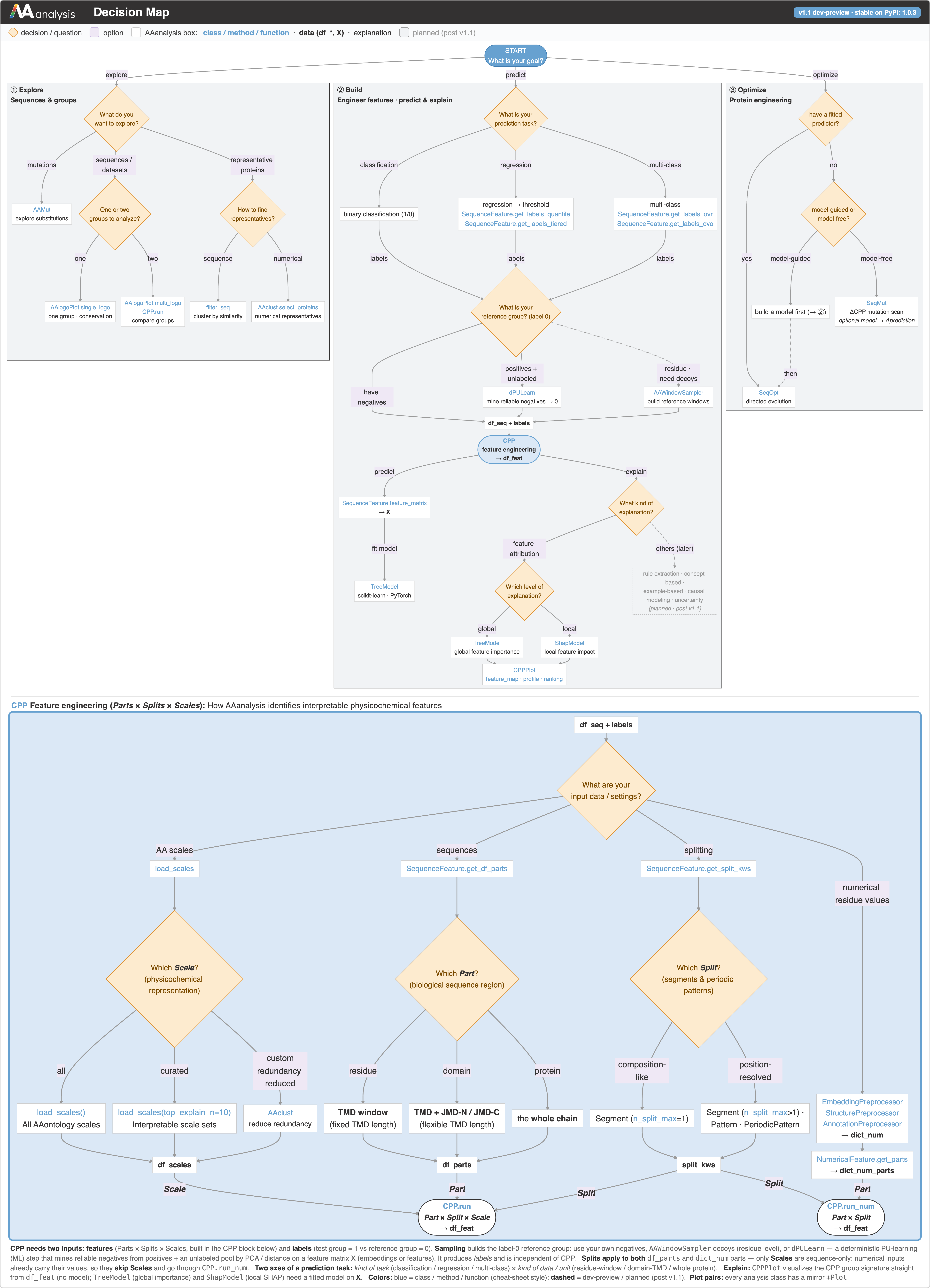
Not sure where to start? Follow the Decision Map
Skim the Decision Map at the bottom of this page: it maps your goal (explore, predict, or optimize) to the exact AAanalysis class or function. Then run the notebooks below for your first result.
The fastest way in is the short notebooks below:
Quick start
The shortest complete loop: load a benchmark dataset, run CPP, and read out the feature signature.
import aaanalysis as aa

df_seq = aa.load_dataset(name="DOM_GSEC", n=50)
labels = df_seq["label"].to_list()

sf = aa.SequenceFeature()
df_parts = sf.get_df_parts(df_seq=df_seq)
cpp = aa.CPP(df_parts=df_parts)
df_feat = cpp.run(labels=labels)            # the CPP signature
df_feat is the CPP signature, the interpretable feature table that the rest
of the workflow (modelling, explanation, plotting) builds on. The notebooks
above walk through this loop step by step.
The two APIs
AAanalysis offers the same analysis two ways, both documented in the Reference:
Building blocks (
import aaanalysis as aa): the individual objects and functions you compose, for full control over each step. See API.Golden pipelines (
import aaanalysis.pipe as ap): stateless one-call wrappers that chain those building blocks into a sensible default workflow. See API (Pipelines).
import aaanalysis as aa            # explicit building blocks
import aaanalysis.pipe as ap      # golden pipelines
Decision Map
The Decision Map lays out the whole framework as a single flowchart: from your goal (explore, predict, or optimize) down to the exact AAanalysis class or function to call, including the CPP feature-engineering panel. Use it to find the right tool for your question; click it to open the full-size version.