AAclustPlot.eval
- static AAclustPlot.eval(df_eval, figsize=(6, 4), dict_xlims=None)[source]
Plots evaluation of
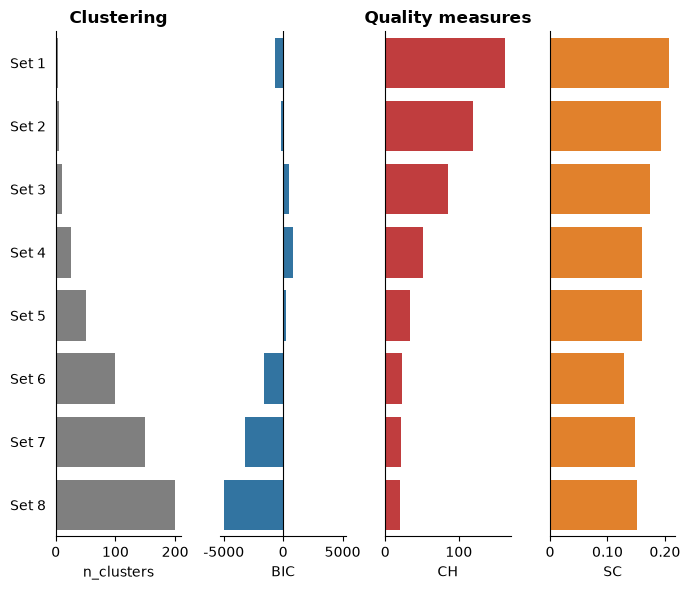
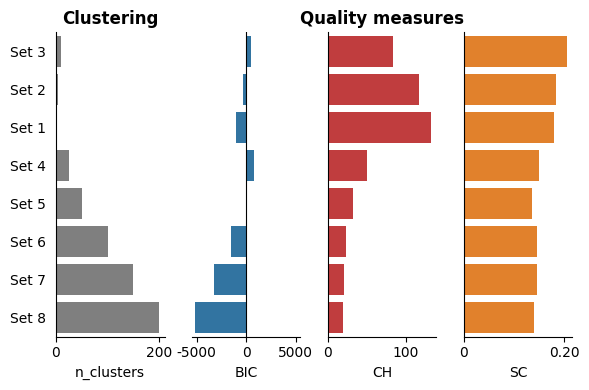
n_clustersand clustering metrics Bayesian Information Criterion (BIC), Calinski-Harabasz (CH), and Silhouette Coefficient (SC) fromdf_eval.The clustering evaluation metrics (BIC, CH, and SC) are ranked by the average of their independent rankings.
Added in version 0.1.0.
- Parameters:
df_eval (pd.DataFrame, shape (n_datasets, n_metrics)) –
DataFrame with evaluation measures for scale sets. Each row corresponds to a specific scale set and columns are as follows:
’name’: Name of clustering datasets.
’n_clusters’: Number of clusters.
’BIC’: Bayesian Information Criterion.
’CH’: Calinski-Harabasz Index.
’SC’: Silhouette Coefficient.
figsize (tuple, default=(6, 4)) – Figure dimensions (width, height) in inches.
dict_xlims (dict, optional) – A dictionary containing x-axis limits for subplots. Keys should be the subplot axis number ({0, 1, 2, 3}) and values should be tuple specifying (
xmin,xmax). IfNone, x-axis limits are auto-scaled.
- Returns:
fig (Figure) – Figure object containing the evaluation subplots.
ax (array of Axes) – Array of Axes objects, each representing a subplot within the figure.
Notes
Returned as a
(fig, ax)pair (seeAAclustPlotfor the shared return contract).The data is ranked in ascending order of the average ranking of the scale sets.
See also
AAclust.eval()for details on evaluation measures.
Examples
To demonstrate the
AAclustPlot().eval()method, we create an example dataset:from sklearn.decomposition import PCA import matplotlib.pyplot as plt import aaanalysis as aa aa.options["verbose"] = False # Obtain example scale dataset df_scales = aa.load_scales() X = df_scales.T # Fit AAclust model and retrieve labels for evaluation aac = aa.AAclust() list_labels = [aac.fit(X, n_clusters=n).labels_ for n in [3, 5, 10, 25, 50, 100, 150, 200]] df_eval = aac.eval(X, list_labels=list_labels)
And can visualize now all results of the `df_eval``. The clustering results are ranked in from top to down by the average ranking over all three quality measures (BIC, SC, and CH):
aac_plot = aa.AAclustPlot(model_class=PCA)
fig, ax = aac_plot.eval(df_eval=df_eval)
plt.show()
You can adjust the x-axis limits of the three quality measures using the
dict_xlimsparameter:dict_xlims = {0:(0, 250), 1:(-7500, 7500), 2:(0, 200), 3:(0, 0.4)} aac_plot.eval(df_eval=df_eval, dict_xlims=dict_xlims) plt.show()

Further parameters.
AAclustPlot.evalalso accepts:figsize— Figure dimensions (width, height) in inches.# Further parameters: figsize sets the figure dimensions (width, height) in inches import matplotlib.pyplot as plt aac_plot.eval(df_eval=df_eval, figsize=(7, 6)) plt.tight_layout() plt.show()