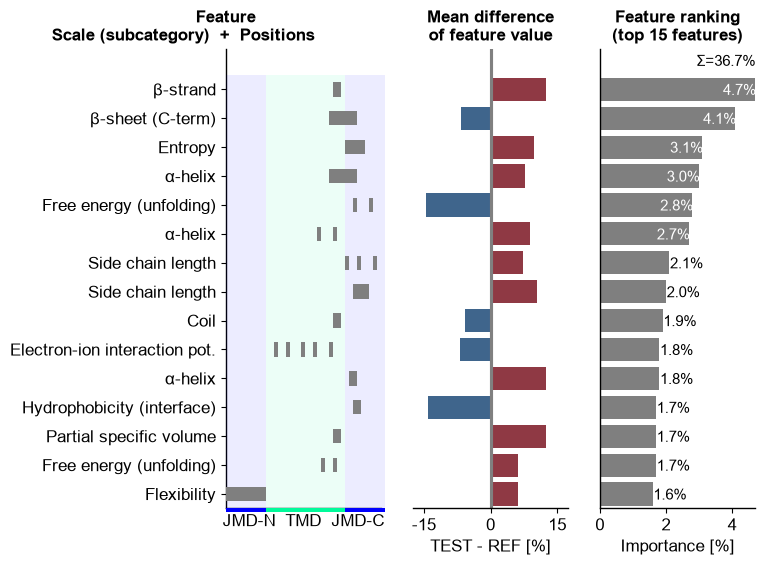
CPPPlot.ranking
- CPPPlot.ranking(df_feat, shap_plot=False, col_dif='mean_dif', col_imp='feat_importance', rank=True, n_top=15, figsize=None, tmd_len=20, tmd_jmd_space=2, tmd_color='mediumspringgreen', jmd_color='blue', tmd_jmd_alpha=0.075, name_test='TEST', name_ref='REF', fontsize_titles=12, fontsize_labels=12, fontsize_annotations=11, xlim_dif=(-17.5, 17.5), xlim_rank=(0, 4), rank_info_xy=None, sample=None)[source]
Plot CPP/-SHAP feature ranking based on feature importance or sample-specific feature impact.
Introduced in [Breimann25], this method visualizes the most important features for discriminating between the test and the reference dataset groups. At sample level, the feature impact derived from SHAP values of a specific sample can be used for ranking if
shap_plot=Trueand ‘feature_impact’ column indf_feat.Added in version 0.1.0.
- Parameters:
df_feat (pd.DataFrame, shape (n_features, n_feature_info)) – Feature DataFrame with a unique identifier, scale information, statistics, and positions for each feature. Must also include feature importance (feat_importance) or impact (
feat_impact_'name') columns.shap_plot (bool, default=False) –
Set the analysis type: CPP Analysis (if
False) for group-level or CPP-SHAP Analysis for sample-level (or subgroup-level) results:CPP Analysis
col_dif: Displays the group-level difference of feature values, with the mean_dif column selected by default.col_imp: Refers to the group-level feat_importance column (shown in gray) used for feature ranking.
CPP-SHAP Analysis
col_dif: Allows the selection of sample-specific differences against the reference group from a mean_dif_’name’ column.col_imp: Enables the selection of specific feature impacts from a feat_impact_’name’ column for an individual sample, where positive (red) and negative (blue) feature impacts are visualized in the ranking.
col_dif (str, default='mean_dif') – Column name in
df_featfor differences in feature values. Must match with theshap_plotsetting.col_imp (str, default='feat_importance') – Column name in
df_featfor feature importance/impact values. Must match with theshap_plotsetting.rank (bool, default=True) – If
True, features will be ranked in descending order ofcol_impvalues.n_top (int, default=15) – The number of top features to display. Should be 1 <
n_top<=n_features.figsize (tuple, optional) –
Figure dimensions (width, height) in inches. When
None(default) and the globalauto_fontoption is enabled, the height grows withn_top(width and fonts fixed); any explicitfigsizeis honored as a fixed size. Withauto_fontdisabled,Nonefalls back to(7, 5).Changed in version 1.1.0: Defaults to
Noneand participates inauto_font; explicitfigsizewins.tmd_len (int, default=20) – Length of target middle domain (TMD) to be depicted (>0).
tmd_jmd_space (int, default=2) – The space between TMD and juxta middle domain (JMD) labels (>0) in the feature position subplot.
tmd_color (str, default='mediumspringgreen') – Color for TMD.
jmd_color (str, default='blue') – Color for JMDs.
tmd_jmd_alpha (int or float, default=0.075) – The transparency alpha value [0-1] of the TMD-JMD area in the feature position subplot.
name_test (str, default="TEST") – Name of the test dataset to show in the mean difference subplot.
name_ref (str, default="REF") – Name of reference dataset to show in the mean difference subplot.
fontsize_titles (int or float, default=12) – Font size of the titles.
fontsize_labels (int or float , default=12) – Font size of plot labels.
fontsize_annotations (int or float, default=11) – Font size of annotations.
xlim_dif (tuple, default=(-17.5, 17.5)) – x-axis limits for the mean difference subplot.
xlim_rank (tuple, default=(0, 4)) – x-axis limits for the ranking subplot. If
None, determined automatically.rank_info_xy (tuple, optional) –
Position (x-axis, y-axis) in ranking subplot for showing additional information (optimized if
None):When
shap_plot=False: Displays sum of feature importance.When
shap_plot=True: Show the sum of the absolute feature impact and the SHAP legend.
sample (str, optional) – Convenience shortcut for sample-level CPP-SHAP ranking. When given (a protein entry name),
col_impis resolved tofeat_impact_<sample>andshap_plotis set toTrueautomatically, removing the manualcol_imp=f"feat_impact_<name>"string-templating.
- Returns:
fig (Figure) – The Figure object for the ranking plot.
ax (array of Axes) – Array of Axes objects, each representing a subplot within the figure.
Notes
Features are shown as ordered in
df_feat. A ranking in descending order based one the following columns is recommended:feat_importance: when feature importance is indf_featandshap_plot=False.feat_impact_'name': when sample-specific feature impact is indf_featandshap_plot=True.
See also
CPP.run()for details on CPP statistical measures of thedf_featDataFrame.SequenceFeaturefor definition of sequenceParts.CPPPlot.feature()for visualization of mean differences for specific features.
Examples
To demonstrate the
CPPPlot().ranking()method, we first load the example feature set from for theDOM_GSECdata (see [Breimann25]):import matplotlib.pyplot as plt import aaanalysis as aa aa.options["verbose"] = False df_feat = aa.load_features() df_feat = df_feat.sort_values(by="feat_importance", ascending=False).reset_index(drop=True) aa.display_df(df_feat, show_shape=True, n_rows=20)
DataFrame shape: (150, 15)
feature category subcategory scale_name scale_description abs_auc abs_mean_dif mean_dif std_test std_ref p_val_mann_whitney p_val_fdr_bh positions feat_importance feat_importance_std 1 TMD_C_JMD_C-Seg...,11)-LIFS790102 Conformation β-strand β-strand Conformational ...n-Sander, 1979) 0.189000 0.125674 0.125674 0.183876 0.218813 0.000001 0.000039 28,29 4.729200 4.776785 2 TMD_C_JMD_C-Seg...2,3)-CHOP780212 Conformation β-sheet (C-term) β-turn (1st residue) Frequency of th...-Fasman, 1978b) 0.199000 0.065983 -0.065983 0.087814 0.105835 0.000000 0.000016 27,28,29,30,31,32,33 4.106000 5.236574 3 TMD_C_JMD_C-Seg...3,4)-HUTJ700102 Energy Entropy Entropy Absolute entrop...Hutchens, 1970) 0.229000 0.098224 0.098224 0.106865 0.124608 0.000000 0.000001 31,32,33,34,35 3.111200 3.109955 4 TMD_C_JMD_C-Seg...2,3)-AURR980110 Conformation α-helix α-helix (middle) Normalized posi...ora-Rose, 1998) 0.211000 0.077355 0.077355 0.102965 0.107453 0.000000 0.000005 27,28,29,30,31,32,33 3.048800 3.623912 5 TMD_C_JMD_C-Pat...4,8)-JANJ790102 Energy Free energy (unfolding) Transfer free e...(TFE) to inside Transfer free e...y (Janin, 1979) 0.187000 0.144354 -0.144354 0.181777 0.233103 0.000001 0.000049 33,37 2.833600 3.640617 6 TMD_C_JMD_C-Pat...4,8)-KANM800103 Conformation α-helix α-helix Average relativ...sa-Tsong, 1980) 0.176000 0.087846 0.087846 0.140464 0.157561 0.000004 0.000113 24,28 2.704000 4.076269 7 TMD_C_JMD_C-Pat...,10)-LEVM760105 Shape Side chain length Side chain length Radius of gyrat... (Levitt, 1976) 0.149000 0.073526 0.073526 0.133612 0.157088 0.000090 0.000714 31,34,38 2.050800 2.338278 8 TMD_C_JMD_C-Seg...4,5)-LEVM760105 Shape Side chain length Side chain length Radius of gyrat... (Levitt, 1976) 0.204000 0.105513 0.105513 0.132849 0.145219 0.000000 0.000009 33,34,35,36 1.992000 2.929460 9 TMD_C_JMD_C-Seg...,11)-QIAN880134 Conformation Coil Coil Weights for coi...ejnowski, 1988) 0.181000 0.057287 -0.057287 0.072234 0.106512 0.000002 0.000076 28,29 1.919600 2.094497 10 TMD-PeriodicPat...3,4)-VELV850101 Energy Electron-ion interaction pot. Electron-ion in...ction potential Electron-ion in...c et al., 1985) 0.180000 0.069277 -0.069277 0.094949 0.119524 0.000002 0.000082 13,16,20,23,27 1.818000 2.308293 11 TMD_C_JMD_C-Seg...6,9)-AURR980110 Conformation α-helix α-helix (middle) Normalized posi...ora-Rose, 1998) 0.211000 0.125350 0.125350 0.160819 0.174121 0.000000 0.000005 32,33 1.788800 2.700803 12 TMD_C_JMD_C-Seg...,10)-WILM950103 Polarity Hydrophobicity (interface) Hydrophobicity (interface) Hydrophobicity ...e et al., 1995) 0.212000 0.141305 -0.141305 0.168603 0.217235 0.000000 0.000005 33,34 1.747200 2.150664 13 TMD_C_JMD_C-Seg...,11)-COHE430101 ASA/Volume Partial specific volume Partial specific volume Partial specifi...n-Edsall, 1943) 0.145000 0.124999 0.124999 0.180151 0.242281 0.000145 0.000912 28,29 1.740800 2.317117 14 TMD_C_JMD_C-Pat...5,8)-RADA880104 Energy Free energy (unfolding) Transfer free e...(TFE) to inside Transfer free e...olfenden, 1988) 0.197000 0.060758 0.060758 0.050818 0.095267 0.000000 0.000019 25,28 1.658800 3.421774 15 JMD_N_TMD_N-Seg...1,2)-KARP850101 Structure-Activity Flexibility Flexibility (0 ...igid neighbors) Flexibility par...s-Schulz, 1985) 0.196000 0.062671 0.062671 0.083456 0.090427 0.000000 0.000023 1,2,3,4,5,6,7,8,9,10 1.574400 1.835403 16 TMD_C_JMD_C-Seg...6,9)-LEVM760105 Shape Side chain length Side chain length Radius of gyrat... (Levitt, 1976) 0.233000 0.137044 0.137044 0.161683 0.176964 0.000000 0.000001 32,33 1.554800 2.109848 17 TMD_C_JMD_C-Pat...5,8)-QIAN880130 Conformation Coil Coil Weights for coi...ejnowski, 1988) 0.162000 0.070292 -0.070292 0.096915 0.128362 0.000020 0.000302 21,25,28 1.528400 2.418922 18 TMD-Pattern(C,5...,15)-OOBM770105 Energy Non-bonded energy Non-bonded energy per residue Short and mediu...take-Ooi, 1977) 0.164000 0.056983 0.056983 0.099221 0.102039 0.000017 0.000274 16,19,22,26 1.305600 1.643621 19 JMD_N_TMD_N-Pat...,11)-PRAM820103 Shape Shape and Surface Correlation coe...t in regression Correlation coe...nnuswamy, 1982) 0.161000 0.057828 0.057828 0.088362 0.106085 0.000024 0.000328 1,5,8,11 1.304400 1.657101 20 TMD-Pattern(C,4,7)-VELV850101 Energy Electron-ion interaction pot. Electron-ion in...ction potential Electron-ion in...c et al., 1985) 0.165000 0.121210 -0.121210 0.143560 0.207767 0.000015 0.000254 24,27 1.302000 1.466618 You can now create the
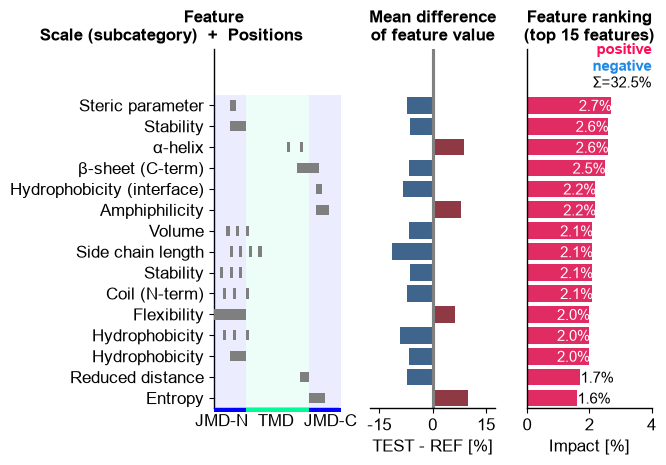
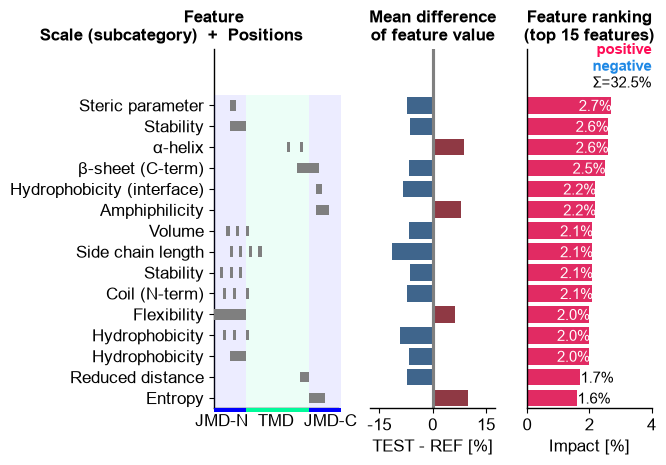
CPP-Ranking Plot, which shows the features in the order of thedf_featDataFrame. Three subplots are given (from left to right):Feature Position Subplot: Shows the position of the respective
Part-Splitcombinations depending on the size of the TMD and JMDs.Feature Mean Difference Subplot: Shows the mean differences between the test and reference dataset. Higher values for the test set are indicated in red and lower values in blue.
Feature Ranking Subplot: Shows the feature importance (or sample-specific impact) as bar chart.
cpp_plot = aa.CPPPlot()
aa.plot_settings(weight_bold=False, short_ticks=True)
cpp_plot.ranking(df_feat=df_feat)
plt.tight_layout()
plt.show()

Select the number of features using the
n_topparameter:# Show ranking of top 20 features cpp_plot.ranking(df_feat=df_feat, n_top=20) plt.tight_layout() plt.show()

Disable the sorting in descending of feature importance order by setting
rank=False(default=True):# Show 15 random features cpp_plot.ranking(df_feat=df_feat.sample(15), rank=False) plt.tight_layout() plt.show()

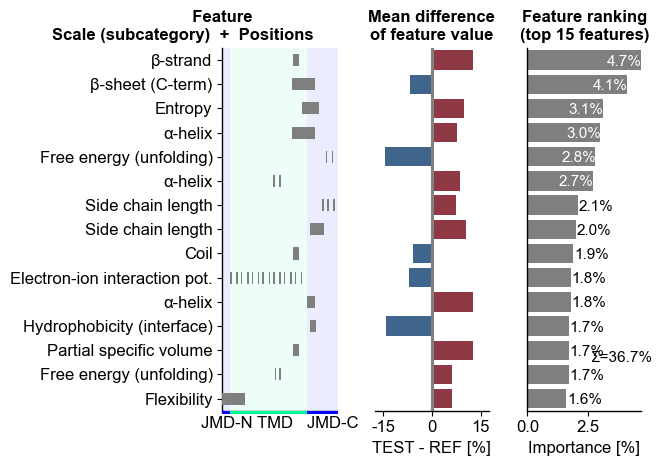
You can adjust the TMD size using the
tmd_lenparameter and the sizes of the JMDs using thejmd_c_lenandjmd_n_lenattributes of theCPPPlotclass:# Change part length cpp_plot = aa.CPPPlot(jmd_n_len=5, jmd_c_len=20) cpp_plot.ranking(df_feat=df_feat, tmd_len=50) plt.tight_layout() plt.show()
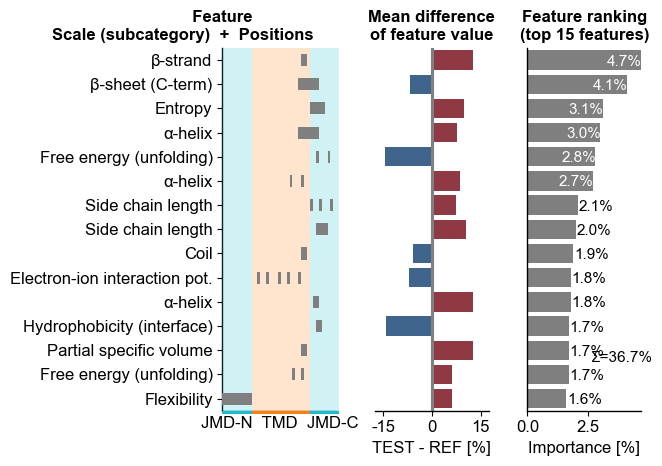
Adjust the colors and transparency using the
tmd_color,jmd_color, andtmd_jmd_alphaparameters:# Create a new CPPPlot object with default jmd length cpp_plot = aa.CPPPlot() cpp_plot.ranking(df_feat=df_feat, tmd_color="tab:orange", jmd_color="tab:cyan", tmd_jmd_alpha=0.2) plt.tight_layout() plt.show()
For the
Feature Mean Difference Subplot, you can adjust the name of the test and reference dataset using thename_testandname_refparameters:# Change name of datasets cpp_plot.ranking(df_feat=df_feat, name_test="Test set", name_ref="Reference set") plt.tight_layout() plt.show()

Potential overlap of labels and other fonts can be mitigated by adjusting the font sizes using the following parameters:
fontsize_titles(default=10),fontsize_labels(default=11), andfontsize_annotations(default=11):# Adjust font sizes cpp_plot.ranking(df_feat=df_feat, name_test="Test set", name_ref="Reference set", fontsize_titles=13, fontsize_labels=8, fontsize_annotations=12) plt.tight_layout() plt.show()

Increase the distance of TMD and JMD labels using the
tmd_jmd_space(default=2) parameter:# Change spacing between TMD and JMDs cpp_plot.ranking(df_feat=df_feat, name_test="Test set", name_ref="Reference set", tmd_jmd_space=6) plt.tight_layout() plt.show()

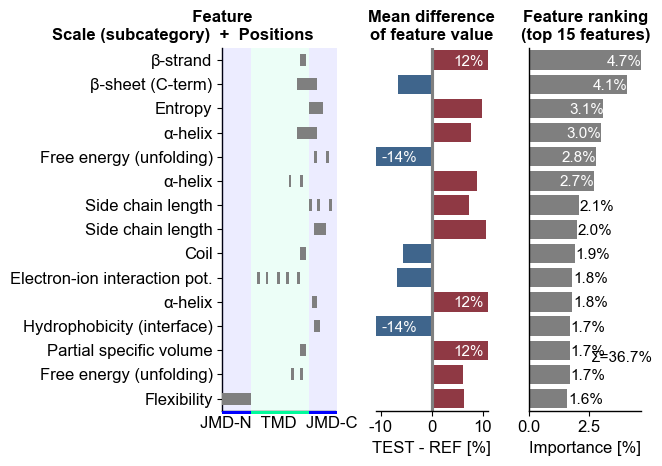
You can adjust the x-limits using
xlim_difandxlim_rank. Mean difference values exceeding the set x-axis limit are given on the respective bars:# Modify x-axis limits cpp_plot.ranking(df_feat=df_feat, xlim_dif=(-11, 11), xlim_rank=(0, 4)) plt.tight_layout() plt.show()
To avoid an overlap of bars with the ranking information (the total feature importance if
shap_plot=False), you can change its x-axis and y-axis position using therank_info_xyparameter:cpp_plot.ranking(df_feat=df_feat, xlim_dif=(-11, 11), xlim_rank=(0, 4), rank_info_xy=(4, 13)) plt.tight_layout() plt.show()

CPP-SHAP analysis
Set
shap_plot=Truefor visualizing the sample-specific feature impact instead of the overall feature importance. To demonstrate this we first obtain the DOM_GSEC example dataset, matching to the already used feature set (see [Breimann25]):aa.options["verbose"] = False # Load example dataset df_seq = aa.load_dataset(name="DOM_GSEC", n=3) labels = df_seq["label"].to_list() # Create feature matrix sf = aa.SequenceFeature() df_parts = sf.get_df_parts(df_seq=df_seq) X = sf.feature_matrix(features=df_feat["feature"], df_parts=df_parts) aa.display_df(df_seq)
entry sequence label tmd_start tmd_stop jmd_n tmd jmd_c 1 Q14802 MQKVTLGLLVFLAGF...PGETPPLITPGSAQS 0 37 59 NSPFYYDWHS LQVGGLICAGVLCAMGIIIVMSA KCKCKFGQKS 2 Q86UE4 MAARSWQDELAQQAE...SPKQIKKKKKARRET 0 50 72 LGLEPKRYPG WVILVGTGALGLLLLFLLGYGWA AACAGARKKR 3 Q969W9 MHRLMGVNSTAAAAA...AIWSKEKDKQKGHPL 0 41 63 FQSMEITELE FVQIIIIVVVMMVMVVVITCLLS HYKLSARSFI 4 P05067 MLPGLALLLLAAWTA...GYENPTYKFFEQMQN 1 701 723 FAEDVGSNKG AIIGLMVGGVVIATVIVITLVML KKKQYTSIHH 5 P14925 MAGRARSGLLLLLLG...EEEYSAPLPKPAPSS 1 868 890 KLSTEPGSGV SVVLITTLLVIPVLVLLAIVMFI RWKKSRAFGD 6 P70180 MRSLLLFTFSACVLL...RELREDSIRSHFSVA 1 477 499 PCKSSGGLEE SAVTGIVVGALLGAGLLMAFYFF RKKYRITIER We can now include the feature impact into the
df_featfor all samples using theShapModelmodel:sm = aa.ShapModel() sm.fit(X, labels=labels) # Include feature value difference for all samples against negatives df_feat = sm.add_sample_mean_dif(X, labels=labels, df_feat=df_feat, drop=True) # Include feature impact of all samples df_feat = sm.add_feat_impact(df_feat=df_feat, drop=True) aa.display_df(df_feat, n_rows=5)
feature category subcategory scale_name scale_description abs_auc abs_mean_dif mean_dif std_test std_ref p_val_mann_whitney p_val_fdr_bh positions mean_dif_Protein0 mean_dif_Protein1 mean_dif_Protein2 mean_dif_Protein3 mean_dif_Protein4 mean_dif_Protein5 feat_impact_Protein0 feat_impact_Protein1 feat_impact_Protein2 feat_impact_Protein3 feat_impact_Protein4 feat_impact_Protein5 1 TMD_C_JMD_C-Seg...,11)-LIFS790102 Conformation β-strand β-strand Conformational ...n-Sander, 1979) 0.189000 0.125674 0.125674 0.183876 0.218813 0.000001 0.000039 28,29 0.286667 -0.192333 -0.094333 0.271667 0.286667 -0.083833 0.050000 -0.310000 -0.160000 0.080000 0.080000 0.080000 2 TMD_C_JMD_C-Seg...2,3)-CHOP780212 Conformation β-sheet (C-term) β-turn (1st residue) Frequency of th...-Fasman, 1978b) 0.199000 0.065983 -0.065983 0.087814 0.105835 0.000000 0.000016 27,28,29,30,31,32,33 -0.048430 -0.023140 0.071570 -0.232290 -0.211860 -0.205570 -2.310000 -2.320000 -2.310000 2.640000 2.510000 2.420000 3 TMD_C_JMD_C-Seg...3,4)-HUTJ700102 Energy Entropy Entropy Absolute entrop...Hutchens, 1970) 0.229000 0.098224 0.098224 0.106865 0.124608 0.000000 0.000001 31,32,33,34,35 0.131267 -0.269733 0.138467 0.231467 0.312467 0.277867 -1.430000 -1.440000 -1.430000 1.620000 1.650000 1.590000 4 TMD_C_JMD_C-Seg...2,3)-AURR980110 Conformation α-helix α-helix (middle) Normalized posi...ora-Rose, 1998) 0.211000 0.077355 0.077355 0.102965 0.107453 0.000000 0.000005 27,28,29,30,31,32,33 0.036667 0.028807 -0.065473 0.137237 0.054097 0.041237 -0.380000 -0.600000 -0.600000 0.610000 0.390000 0.300000 5 TMD_C_JMD_C-Pat...4,8)-JANJ790102 Energy Free energy (unfolding) Transfer free e...(TFE) to inside Transfer free e...y (Janin, 1979) 0.187000 0.144354 -0.144354 0.181777 0.233103 0.000001 0.000049 33,37 0.043333 0.228333 -0.271667 -0.030667 0.043333 -0.049167 0.040000 -0.120000 -0.120000 0.090000 0.090000 0.090000 Finally, we can visualize the feature impact for a selected sample by providing the respective column name in
col_impand settingshap_plot=True:# Show feature impact based on 6 samples cpp_plot.ranking(df_feat=df_feat, col_imp="feat_impact_Protein4", shap_plot=True) plt.tight_layout() plt.show()

Sort the
df_feataccording the respective feature impact in descending order to show the top n features. We can further specify the feature value difference and the name for the specific sample using thecol_difandname_testparameters:# Sort features in descending order for respective sample df_feat = df_feat.sort_values(by="feat_impact_Protein4", ascending=False) # Show ranked feature impact and feature value difference of Protein4 against negative samples cpp_plot.ranking(df_feat=df_feat, col_dif="mean_dif_Protein4", col_imp="feat_impact_Protein4", name_test="Protein4", shap_plot=True) plt.tight_layout() plt.show()

Shortcut — the ``sample=`` parameter. For the ranking,
sample=resolvescol_imp='feat_impact_<sample>'and setsshap_plot=Truein a single argument (the ranking has no sequence axis, so no sequence parts are needed). The two calls below are equivalent:# Explicit: name the impact column and set shap_plot by hand cpp_plot.ranking(df_feat=df_feat, col_imp="feat_impact_Protein4", shap_plot=True) plt.tight_layout() plt.show() # Shortcut: sample= resolves col_imp='feat_impact_Protein4' and shap_plot=True cpp_plot.ranking(df_feat=df_feat, sample="Protein4") plt.tight_layout() plt.show()
Further parameters.
CPPPlot.rankingalso accepts:figsize— Figure dimensions (width, height) in inches.# Further parameters: figsize sets the figure dimensions (width, height) in inches import matplotlib.pyplot as plt df_feat_rk = aa.load_features().sort_values(by="feat_importance", ascending=False) cpp_plot.ranking(df_feat=df_feat_rk, figsize=(8, 6)) plt.tight_layout() plt.show()