options
- options = <aaanalysis.config.Settings object>
A class for managing system-level settings for AAanalysis.
This class mimics a dictionary-like interface, allowing the setting and retrieving of system-level options. It is designed to be used as a single global instance,
options.- Parameters:
set (The following options can be)
verbose (bool or 'off', default='off') – Sets verbose mode to
TrueorFalseglobally if not ‘off’.random_state (int, None, or 'off', default='off') –
The seed used by the random number generator.
If set to a positive integer, results of stochastic processes are consistent, enabling reproducibility.
If set to
None, stochastic processes will be truly random.If set to ‘off’, no global random state variable will be set, allowing the underlying libraries to use their default random state behavior.
n_jobs (int, None, or 'off', default='off') –
Global override for the per-call
n_jobsof parallel-capable methods.If set to a positive integer, that many CPU cores are used.
If set to
-1, all available cores are used.If set to ‘off’, the per-call
n_jobsargument is used (whereNoneis optimized automatically for the job size, and-1uses all cores).
allow_multiprocessing (bool, default=True) – Whether multiprocessing is allowed in general. If
False,n_jobsis automatically set to 1.name_tmd (str, default='TMD') – Name of target middle domain (TMD) used in CPP plots.
name_jmd_n (str, default='JMD_N') – Name of N-terminal juxta middle domain (JMD-N) used in CPP plots.
name_jmd_c (str, default='JMD_C') – Name of C-terminal juxta middle domain (JMD-C) used in CPP plots.
ext_len (int, default=0) – Length of TMD-extending part (starting from C and N terminal part of TMD, >=0). Disabled (set to 0) by default.
jmd_n_len (int, default=None) – Length of N-terminal JMD (JMD-N) in number of amino acids. If
None,jmd_n_lenis set locally.jmd_c_len (int, default=None) – Length of C-terminal JMD (JMD-C) in number of amino acids. If
None,jmd_c_lenis set locally.df_scales (DataFrame, optional) – Scale DataFrame used in CPP algorithm. Adjust on system level if non-default scales are used. If
None, AAanalysis framework will use the scale DataFrame loaded byload_scales()withname='scales'.df_cat (DataFrame, optional) – Scale category DataFrame used in CPP algorithm. Adjust on system level if non-default scale categories are used. If
None, AAanalysis framework will use the scale category DataFrame loaded byload_scales()withname='scales_cat'.auto_font (bool, default=True) – Global toggle for automatic, size-stable plot sizing. When
True(default), the composite CPP plots (CPPPlot.feature_map(),CPPPlot.heatmap(),CPPPlot.profile()) hold each grid cell at a constant physical size and grow the figure with the data (number of scale subcategories and residue positions), so subcategory labels, position ticks and residue letters stay at a constant, legible font regardless of grid size — no manualplot_settings(font_scale=...)needed. An explicitfigsizealways wins (auto-sizing is skipped). WhenFalse, plots keep their fixed default figure size, reproducing the previous (pre-auto-font) output.
See also
numpy.random.RandomStatefor details on therandom_statevariable used to make stochastic processes yielding consistent results.SequenceFeaturefor definition of sequenceParts.load_scales()for details on scale and scale category DataFrames.
Warning
Multiprocessing Compatibility: Enabling multiprocessing (
allow_multiprocessing=True) can lead to issues in environments that don’t support forking or when interfacing with certain libraries. If encountering errors, consider settingallow_multiprocessing=False. Note that this may affect performance in computation-intensive operations.
Examples
Adjust system level options using the
optionsSetting object, which ca be used like a dictionary:import aaanalysis as aa print(aa.options)
{'verbose': 'off', 'random_state': 'off', 'n_jobs': 'off', 'allow_multiprocessing': True, 'name_tmd': 'TMD', 'name_jmd_n': 'JMD-N', 'name_jmd_c': 'JMD-C', 'ext_len': 0, 'jmd_n_len': None, 'jmd_c_len': None, 'df_scales': None, 'df_cat': None, 'auto_font': True}
You can disable general model verbosity, such as progress updates from intensive algorithms or warnings, by setting
verbose=Falseaa.options["verbose"] = False
Change the random state of stochastic process such as clustering by setting
random_state:aa.options["random_state"] = 42 # Set to 42 (otherwise not specified)
Adjust the names of the
Partdomains by thename_tmd,name_jmd_n, andname_jmd_cparametersimport matplotlib.pyplot as plt aa.options["name_jmd_n"] = "Part 1" aa.options["name_tmd"] = "Part 2" aa.options["name_jmd_c"] = "Part 3" df_feat = aa.load_features() cpp_plot = aa.CPPPlot() cpp_plot.ranking(df_feat=df_feat) plt.tight_layout() plt.show()
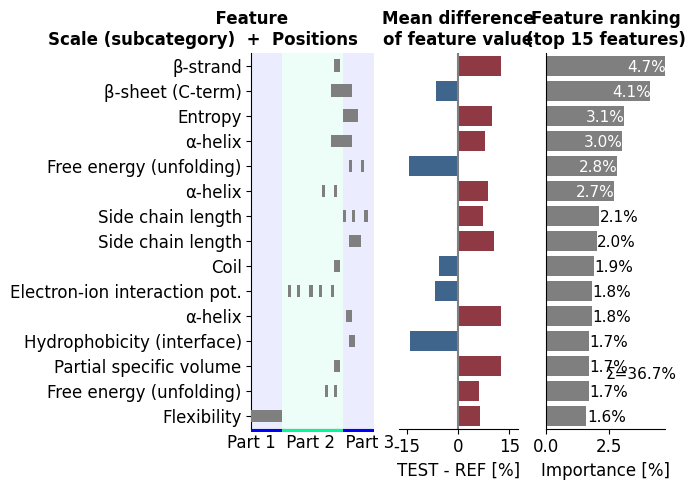
Adjust the length of the juxta middle domains (JMD) globally using the
jmd_n_lenand ``jmd_c_len``` parameters:aa.options["jmd_n_len"] = 0 aa.options["jmd_c_len"] = 20 # Remove all features occurring in JMD-N df_feat = df_feat[~df_feat["feature"].str.contains("JMD_N")] cpp_plot.ranking(df_feat=df_feat) plt.show()
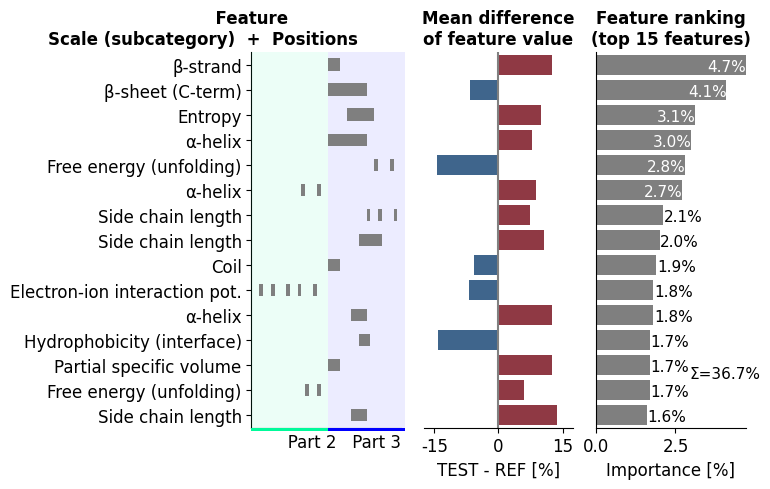
Change default
df_scalesanddf_catDataFrame in case you want to use other scales or adjust your amino acid alphabet:# Add average value for 'X' nf = aa.NumericalFeature() # Retrieve default scale from CPPPlot class df_scales = aa.CPPPlot()._df_scales aa.display_df(df_scales, n_cols=3, show_shape=True)
DataFrame shape: (20, 586)
ANDN920101 ARGP820101 ARGP820102 AA A 0.494000 0.230000 0.355000 C 0.864000 0.404000 0.579000 D 1.000000 0.174000 0.000000 E 0.420000 0.177000 0.019000 F 0.877000 0.762000 0.601000 G 0.025000 0.026000 0.138000 H 0.840000 0.230000 0.082000 I 0.000000 0.838000 0.440000 K 0.506000 0.434000 0.003000 L 0.272000 0.577000 1.000000 M 0.704000 0.445000 0.824000 N 0.988000 0.023000 0.057000 P 0.605000 0.736000 0.223000 Q 0.519000 0.000000 0.211000 R 0.531000 0.226000 0.047000 S 0.679000 0.019000 0.289000 T 0.494000 0.019000 0.248000 V 0.000000 0.498000 0.324000 W 0.926000 1.000000 0.226000 Y 0.802000 0.709000 0.107000 df_scales_new = nf.extend_alphabet(df_scales=df_scales, new_letter='X') aa.options["df_scales"] = df_scales_new # Retrieve new scale DataFrame from CPP plot object _df_scales_new = aa.CPPPlot()._df_scales aa.display_df(_df_scales_new, n_cols=3, row_to_show="X", show_shape=True)
DataFrame shape: (21, 586)
ANDN920101 ARGP820101 ARGP820102 AA X 0.577300 0.376350 0.288650 Keep dense composite plots stable across data sizes with the
auto_fontoption (defaultTrue). It holds each heatmap cell at a constant physical size and grows the figure with the data, so subcategory labels, position ticks and residue letters stay at a constant, legible size no matter how many features the map has — no manualplot_settings(font_scale=...)needed. Set it toFalseto reproduce the previous fixed-size figures.# Reset the options changed above for a clean comparison aa.options["jmd_n_len"] = 10 aa.options["jmd_c_len"] = 10 aa.options["name_jmd_n"] = "JMD-N" aa.options["name_tmd"] = "TMD" aa.options["name_jmd_c"] = "JMD-C" df_feat = aa.load_features() # DOM_GSEC feature set (many subcategories)
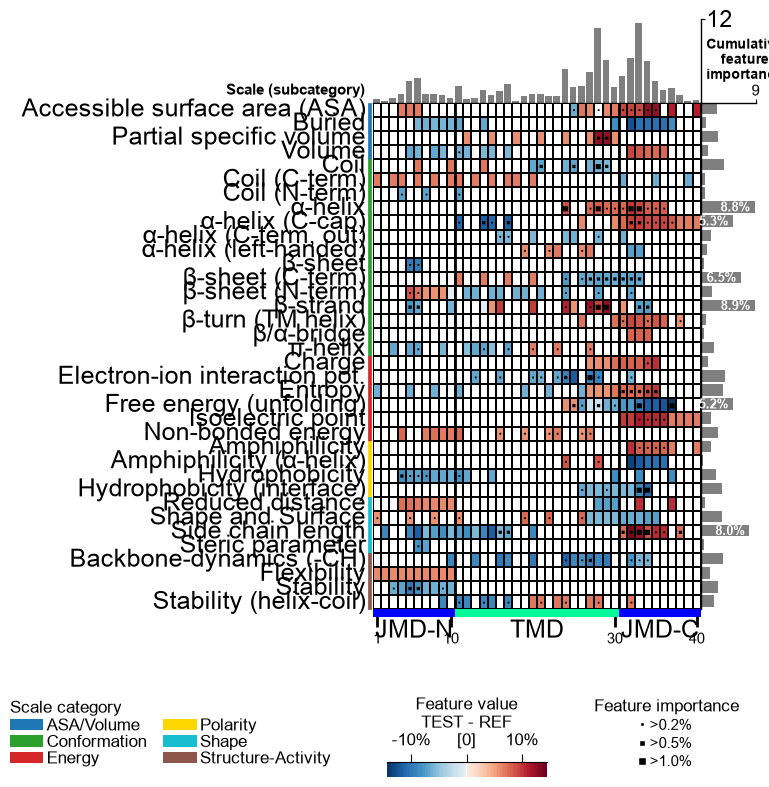
With
auto_font=True(default) the figure grows so every cell and label stays readable:aa.options["auto_font"] = True aa.plot_settings() aa.CPPPlot().feature_map(df_feat=df_feat) plt.tight_layout() plt.show()
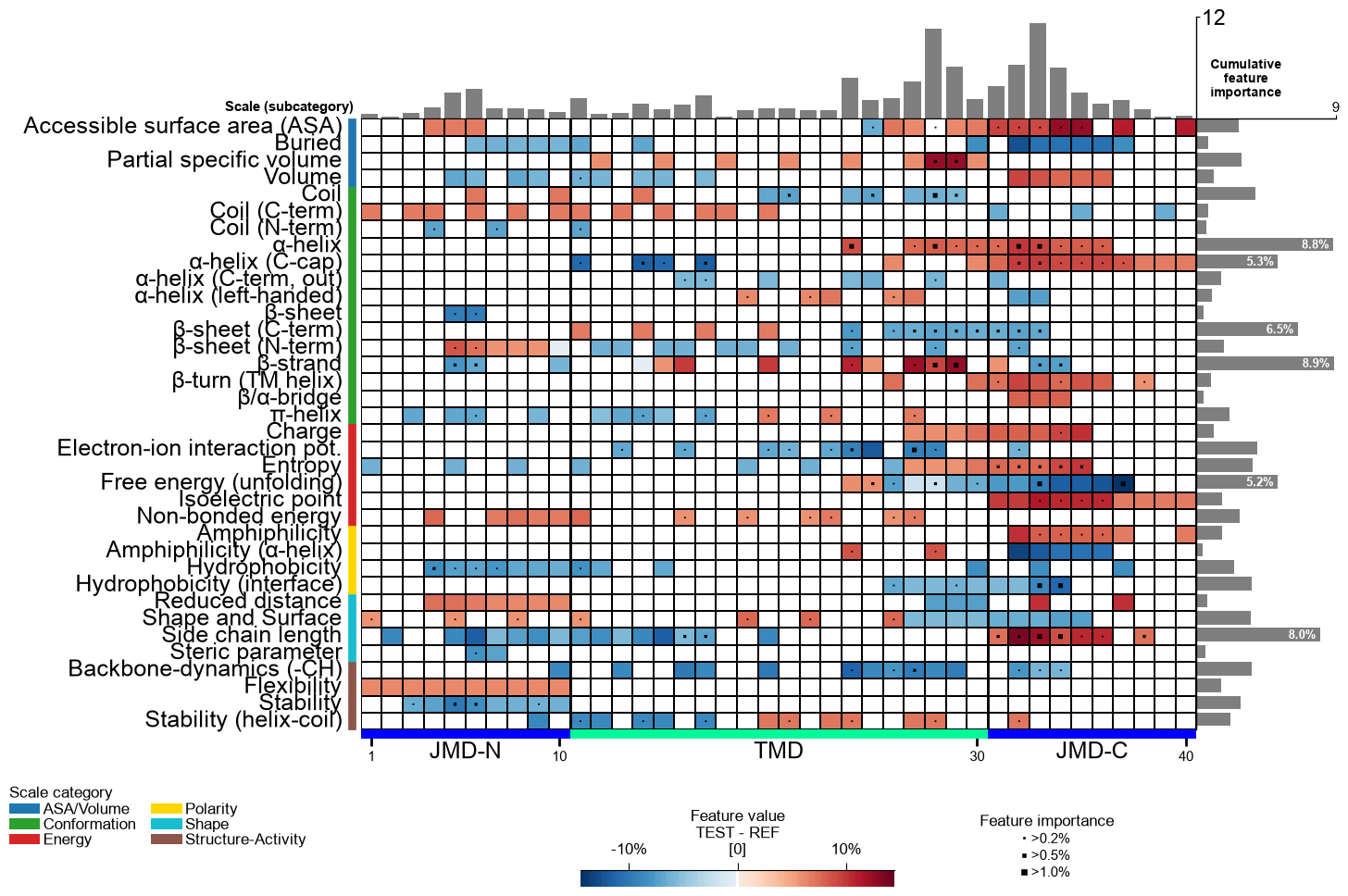
With
auto_font=Falsethe figure keeps its fixed default size (the previous behavior):aa.options["auto_font"] = False aa.plot_settings() aa.CPPPlot().feature_map(df_feat=df_feat) plt.tight_layout() plt.show() aa.options["auto_font"] = True # restore default