P9: Interpretability
Turn a group-level CPP signature into a per-sample, single-residue
explanation: SHAP and the CPP-SHAP heatmap. A CPP signature (P1)
tells you which position-resolved physicochemical features separate a
test group (label=1) from a reference group (label=0)
on average. This protocol goes one level deeper: given that signature
and a fitted tree model, ShapModel computes SHapley Additive
exPlanations (SHAP) values, the signed contribution of each feature to
one protein’s prediction score. The sample-level heatmap()
(with shap_plot=True) then anchors those signed attributions onto
the real residue positions of a single protein, so the explanation reads
like “this protein’s TMD hydrophobicity at this position raised its
substrate score” rather than an abstract feature index.
The signature is the group story; SHAP is the per-protein story. Feature importance is unsigned and group-level (how much does this feature matter overall?); feature impact is signed and sample-level (how much, and in which direction, did this feature push the score for this one protein?): red pushes toward the test class, blue toward the reference class. Read one sample’s impact as a local explanation, not as a new group claim.
We stay at the domain level (dataset prefix DOM_): the unit of
comparison is the transmembrane-domain (TMD) part set of the
gamma-secretase substrate task (DOM_GSEC), and we explain a single
protein, APP, within it.
When to use it. Use this protocol when you already have a CPP
signature (df_feat) plus a labelled feature matrix, and you
want to explain a single protein’s prediction rather than the group as
a whole. The biological question shifts from “what distinguishes
substrates from non-substrates?” (determinant discovery, P1) to:
“Why does the model classify **this* protein (e.g. APP) as a gamma-secretase substrate, and where in its sequence do the decisive physicochemical differences act?”*
This is the protein-prediction analogue of a feature-attribution map (LIME / SHAP) in deep learning, but every attribution is anchored to an interpretable physicochemical scale and to a concrete residue position, not a black-box embedding dimension.
When not to use it. SHAP explains; it does not establish trust.
Don’t use a single sample’s feature impact to make a group claim
(“this scale defines substrates”): that is the signature’s job (P1).
Don’t read it as proof the model generalizes: attributions are sample-
and model-specific, and a model fit on a tiny set can attribute
confidently to noise, so stability and controls come next (P10). And
skip it entirely if you only need a ranked group signature:
add_feat_importance() already gives the unsigned,
group-level ranking without fitting SHAP.
Input. This protocol receives its signature from P1: CPP signature and a fitted tree model from P8: Prediction. Concretely it needs:
``df_seq`` with a binary
labelcolumn (test group = 1, reference group = 0). Here: the bundledDOM_GSECset (gamma-secretase substrates vs. non-substrates), a domain-level task over the TMD and its flanking juxtamembrane (JMD) parts.``df_feat``, the CPP signature from P1 (
aa.load_features(name="DOM_GSEC")provides a precomputed signature here so this protocol stays self-contained).``X``, the
(n_samples, n_features)feature matrix built fromdf_feat["feature"]viafeature_matrix().``labels``, the class vector aligned to the rows of
X.
We pick one protein to explain: APP (UniProt P05067), the
Alzheimer’s-disease amyloid precursor protein and a canonical
gamma-secretase substrate.
import aaanalysis as aa
import matplotlib.pyplot as plt

aa.options["verbose"] = False
aa.options["random_state"] = 42

# Small fixture: 50 per class (100 proteins total) keeps SHAP fitting fast
df_seq = aa.load_dataset(name="DOM_GSEC", n=50, random=False, non_canonical_aa="remove",
                         min_len=None, max_len=None, aa_window_size=9, verbose=False)
labels = df_seq["label"].to_list()

# CPP signature (from Protocol 1) and the feature matrix it indexes
df_feat = aa.load_features(name="DOM_GSEC")
sf = aa.SequenceFeature()
df_parts = sf.get_df_parts(df_seq=df_seq, list_parts=None, all_parts=False,
                           jmd_n_len=10, jmd_c_len=10, tmd_len=None,
                           remove_entries_with_gaps=False, replace_non_canonical_aa=False)
X = sf.feature_matrix(df_parts=df_parts, features=df_feat["feature"], df_scales=None,
                      accept_gaps=False, n_jobs=1, batch=False, df_seq=None, df_parts_kws=None)

# Locate APP's row in X (non-substrates come first, so APP is NOT index 0; it sits at 50)
pos_app = list(df_seq["entry"]).index("P05067")
Run. Four steps, all on the real API (see the ShapModel tutorial for the function details):
Fit :class:`~aaanalysis.ShapModel`: trains the tree models and runs the SHAP explainer over several Monte-Carlo rounds, storing the per-sample attributions in
shap_values.Add the feature value difference for APP (
add_sample_mean_dif): how APP’s feature values differ from the reference-group average.Add the feature impact for APP (
add_feat_impact): the signed, normalized SHAP attribution per feature.Visualize with the sample-level
CPPPlotmethods (shap_plot=True).
# Fit ShapModel (pro feature; shap ships with the `pro` extra)
try:
    sm = aa.ShapModel(list_model_classes=None, list_model_kwargs=None,
                      verbose=False, random_state=42)
    sm = sm.fit(X, labels=labels, label_target_class=1, n_rounds=3,  # 3 rounds is enough here
                is_selected=None, fuzzy_labeling=False, n_background_data=None)
except ImportError as e:
    raise ImportError("ShapModel requires shap: pip install aaanalysis[pro]") from e

# Feature value difference: APP vs. the reference (non-substrate) group average
df_feat = sm.add_sample_mean_dif(X, labels=labels, label_ref=0, df_feat=df_feat,
                                 drop=False, samples=pos_app, names="APP",
                                 group_average=False)
# Signed SHAP feature impact for APP (normalized to % of total absolute impact)
df_feat = sm.add_feat_impact(df_feat=df_feat, drop=False, samples=pos_app, names="APP",
                             normalize=True, group_average=False,
                             shap_feat_importance=False)

aa.display_df(df=df_feat[["feature", "category", "mean_dif_APP", "feat_impact_APP"]], n_rows=10, show_shape=True)
DataFrame shape: (150, 4)
| feature | category | mean_dif_APP | feat_impact_APP | |
|---|---|---|---|---|
| 1 | TMD_C_JMD_C-Seg...3,4)-KLEP840101 | Energy | 0.224000 | 0.660000 |
| 2 | TMD_C_JMD_C-Seg...3,4)-FINA910104 | Conformation | 0.194644 | 1.280000 |
| 3 | TMD_C_JMD_C-Seg...6,9)-LEVM760105 | Shape | 0.300050 | 1.570000 |
| 4 | TMD_C_JMD_C-Seg...3,4)-HUTJ700102 | Energy | 0.177140 | 3.050000 |
| 5 | TMD_C_JMD_C-Seg...6,9)-RADA880106 | ASA/Volume | 0.201494 | 1.300000 |
| 6 | TMD_C_JMD_C-Seg...2,3)-KLEP840101 | Energy | 0.167146 | 1.250000 |
| 7 | TMD_C_JMD_C-Seg...4,5)-FAUJ880109 | Energy | 0.146250 | 0.210000 |
| 8 | TMD_C_JMD_C-Seg...3,4)-JANJ780101 | ASA/Volume | 0.373808 | 0.540000 |
| 9 | TMD_C_JMD_C-Seg...,10)-WILM950103 | Polarity | -0.327810 | 2.010000 |
| 10 | TMD_C_JMD_C-Seg...6,9)-AURR980110 | Conformation | 0.184830 | 0.860000 |
# APP's sequence parts, used to anchor the plots to real residues
seq_kws = sf.get_seq_kws(df_seq=df_seq, df_parts=df_parts, sample="P05067")
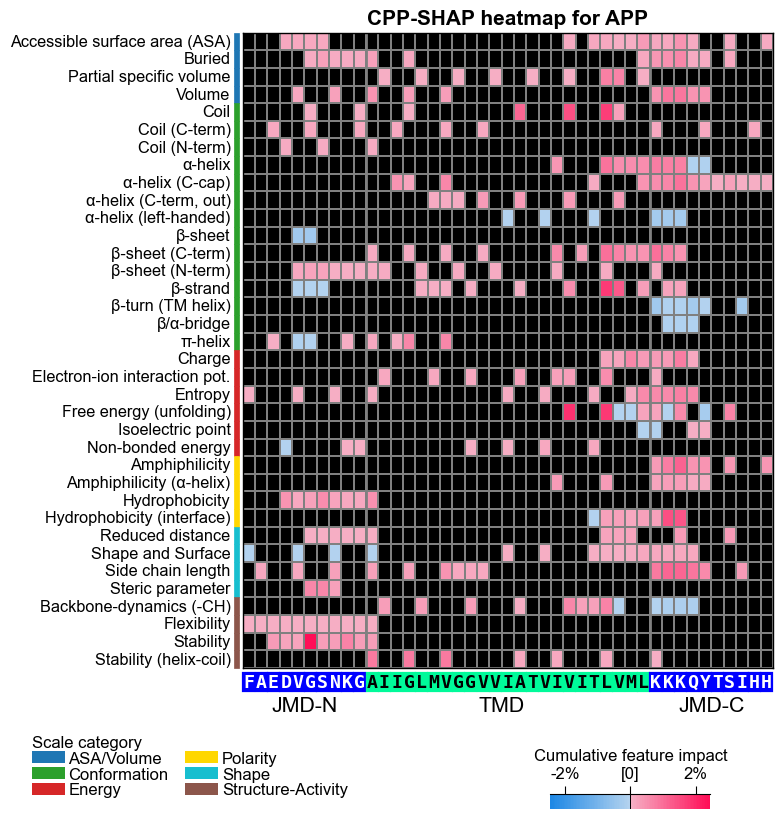
# CPP-SHAP heatmap (sample level): the headline figure.
# Each cell is the SIGNED SHAP impact of one feature on APP's substrate score,
# anchored to its real residue position and scale subcategory
# (red = pushes APP toward "substrate", blue = pushes toward "non-substrate").
fs = aa.plot_gcfs()
aa.plot_settings(font_scale=0.65, weight_bold=False)
cpp_plot = aa.CPPPlot()
fig, ax = cpp_plot.heatmap(df_feat=df_feat, shap_plot=True,
                           col_val="feat_impact_APP", name_test="APP", **seq_kws)
plt.title("CPP-SHAP heatmap for APP", fontsize=fs + 5, weight="bold")
plt.tight_layout()
plt.show()
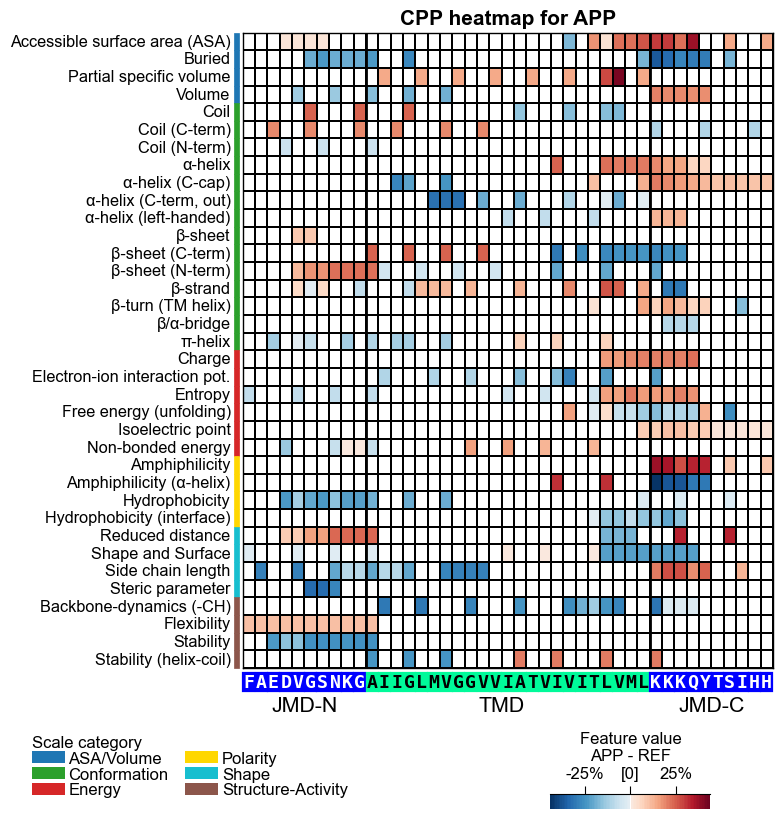
# CPP heatmap (sample level, mean-difference mode):
# each cell is APP's feature VALUE difference vs. the reference-group average,
# per scale subcategory and residue position (the complement to the impact heatmap above).
aa.plot_settings(font_scale=0.65, weight_bold=False)
fig, ax = cpp_plot.heatmap(df_feat=df_feat, shap_plot=True,
                           col_val="mean_dif_APP", name_test="APP", **seq_kws)
plt.title("CPP heatmap for APP", fontsize=fs + 5, weight="bold")
plt.tight_layout()
plt.show()
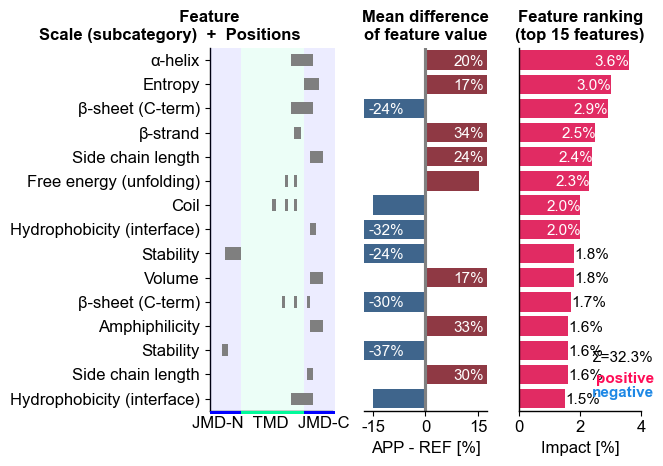
# CPP-SHAP ranking: top features for APP ordered by impact magnitude
aa.plot_settings(short_ticks=True, weight_bold=False)
fig, ax = cpp_plot.ranking(df_feat=df_feat, shap_plot=True,
                           col_dif="mean_dif_APP", col_imp="feat_impact_APP",
                           name_test="APP")
plt.tight_layout()
plt.show()

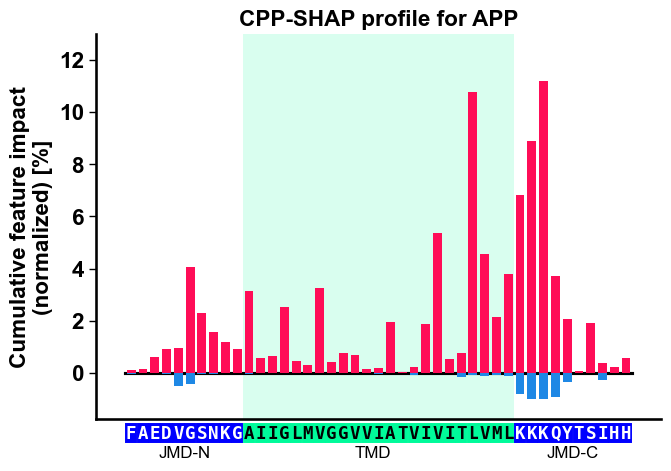
# CPP-SHAP profile: cumulative signed impact per residue position along APP
aa.plot_settings(font_scale=0.9)
fig, ax = cpp_plot.profile(df_feat=df_feat, shap_plot=True,
                           col_imp="feat_impact_APP", **seq_kws)
plt.title("CPP-SHAP profile for APP")
plt.tight_layout()
plt.show()
Importance is not impact. This is the distinction the protocol
opened with, so it deserves a picture rather than a sentence. Both
columns are already on df_feat: feat_importance is the
group-level, unsigned ranking that TreeModel fitted over all 100
proteins, and feat_impact_APP is the sample-level, signed
attribution for APP alone. The same features are drawn twice below, once
by each measure. They agree loosely and disagree in detail: a feature
can carry real impact for APP while the group ranking scores it at zero,
and the four blue bars are features pushing APP away from the
substrate class even though the unsigned group ranking has no way to say
so.
# Concept figure: group-level importance (unsigned) vs APP's impact (signed).
# Selected as the 8 strongest positive and 4 strongest negative impacts, so the
# signed half genuinely shows both directions.
import numpy as np
import pandas as pd
import seaborn as sns

ranked = df_feat.reindex(df_feat["feat_impact_APP"].sort_values(ascending=False).index)
top = pd.concat([ranked.head(8), ranked.tail(4)])
top = top.reindex(top["feat_impact_APP"].sort_values().index)
labels_feat = [f"{row.subcategory} [{row.positions.split(',')[0]}-{row.positions.split(',')[-1]}]"
               for row in top.itertuples()]
y = np.arange(len(top))

aa.plot_settings(font_scale=0.75, weight_bold=False)
c_neg, c_pos = aa.plot_get_clist(n_colors=2)
fig, axes = plt.subplots(1, 2, figsize=(9.5, 4.4), sharey=True)
axes[0].barh(y, top["feat_importance"], color="tab:grey", zorder=3)
axes[0].set_xlabel("Feature importance (%)")
axes[0].set_title("Group level, unsigned", loc="left", size=aa.plot_gcfs())
axes[0].set_yticks(y)
axes[0].set_yticklabels(labels_feat)
axes[1].barh(y, top["feat_impact_APP"],
             color=[c_pos if v > 0 else c_neg for v in top["feat_impact_APP"]], zorder=3)
axes[1].axvline(0, color="black", lw=0.8)
axes[1].set_xlabel("Feature impact for APP (%)")
axes[1].set_title("Sample level, signed", loc="left", size=aa.plot_gcfs())
for ax in axes:
    ax.grid(axis="x", color="0.9", zorder=0)
sns.despine()
fig.suptitle("Same features, two questions: what matters to the group vs what moved APP", y=1.0)
plt.tight_layout()
plt.show()

# How loosely the two agree, as one number.
round(float(np.corrcoef(df_feat["feat_importance"], df_feat["feat_impact_APP"].abs())[0, 1]), 3)

0.581
Further parameters. The rest of the ShapModel surface, passed by
name: the explainer the model wraps, the fuzzy-labeling knobs that let
partially-labelled samples contribute, and the group_average form of
both add_* methods, which writes one column for the whole test
group instead of one column per protein (drop=True replaces the
per-protein columns on the returned frame; without it both methods
refuse to write a second set). The group-average columns are the bridge
back to the group story: they are what you compare a single protein’s
explanation against.
# The full ShapModel surface. `group_average=True` explains the test group as a
# whole, so the columns are named for the group rather than for one protein.
# `drop=True` replaces the per-protein APP columns on the returned frame (both
# methods refuse to write a second set of impact columns otherwise).
import shap

sm = aa.ShapModel(explainer_class=shap.TreeExplainer, explainer_kwargs=None,
                  list_model_classes=None, list_model_kwargs=None,
                  verbose=False, random_state=42)
sm = sm.fit(X, labels=labels, label_target_class=1, n_rounds=2, is_selected=None,
            fuzzy_labeling=False, fuzzy_aggregation="interpolate",
            n_background_data=None, df_seq=None, fuzzy_labels=None)

df_feat_group = sm.add_sample_mean_dif(X, labels=labels, label_ref=0, df_feat=df_feat,
                                       drop=True, samples=None, names=None,
                                       group_average=True, df_seq=None,
                                       sample_positions=None, X_ref=None)
df_feat_group = sm.add_feat_impact(df_feat=df_feat_group, drop=True, samples=None,
                                   names=None, normalize=True, group_average=True,
                                   shap_feat_importance=False, df_seq=None,
                                   sample_positions=None)
cols_group = [c for c in df_feat_group.columns
              if c == "feature" or c.startswith(("mean_dif", "feat_impact"))]
aa.display_df(df=df_feat_group[cols_group], n_rows=10, show_shape=True)
DataFrame shape: (150, 5)
| feature | mean_dif | mean_dif_Group | feat_impact_Group | feat_impact_std_Group | |
|---|---|---|---|---|---|
| 1 | TMD_C_JMD_C-Seg...3,4)-KLEP840101 | 0.103666 | 0.087000 | 0.260000 | 9.437850 |
| 2 | TMD_C_JMD_C-Seg...3,4)-FINA910104 | 0.085064 | 0.076430 | 1.850000 | 15.964921 |
| 3 | TMD_C_JMD_C-Seg...6,9)-LEVM760105 | 0.137044 | 0.130592 | 1.530000 | 12.584665 |
| 4 | TMD_C_JMD_C-Seg...3,4)-HUTJ700102 | 0.098224 | 0.089832 | 0.860000 | 39.997122 |
| 5 | TMD_C_JMD_C-Seg...6,9)-RADA880106 | 0.095071 | 0.096727 | -1.670000 | 19.920655 |
| 6 | TMD_C_JMD_C-Seg...2,3)-KLEP840101 | 0.058671 | 0.048572 | 2.040000 | 13.636707 |
| 7 | TMD_C_JMD_C-Seg...4,5)-FAUJ880109 | 0.146661 | 0.125000 | 0.120000 | 10.143414 |
| 8 | TMD_C_JMD_C-Seg...3,4)-JANJ780101 | 0.124317 | 0.110612 | -1.420000 | 5.544531 |
| 9 | TMD_C_JMD_C-Seg...,10)-WILM950103 | -0.141305 | -0.127200 | 1.800000 | 23.797796 |
| 10 | TMD_C_JMD_C-Seg...6,9)-AURR980110 | 0.125350 | 0.119845 | -1.150000 | 21.671090 |
Output. df_feat gains two sample-level columns:
mean_dif_APP: APP’s feature value difference vs. the reference-group average (sign = direction).feat_impact_APP: the signed SHAP attribution per feature, normalized so the absolute values sum to 100%.
Sample-level CPP-SHAP figures:
CPP-SHAP heatmap (impact mode): the headline figure; each cell is the signed SHAP impact of one feature on APP’s score (diverging colormap, red positive / blue negative), per scale subcategory and residue position.
CPP heatmap (mean-difference mode): each cell is APP’s feature value difference vs. the reference-group average, the complement that shows where APP physically differs.
Ranking: APP’s top features ordered by impact magnitude.
Profile: cumulative signed impact along the residue positions of APP’s JMD-N / TMD / JMD-C.
Importance vs impact: the same features scored by the unsigned group-level ranking and by APP’s signed attribution, side by side.
Every figure is anchored to APP’s actual sequence (jmd_n, tmd,
jmd_c), so an attribution can be read off a specific residue.
How to interpret. A few things are happening in these figures. The heatmap row tells you which physicochemical subcategory and where along APP’s parts; the color tells you direction; the cumulative bars sum the signed impact per residue position. Read them like this:
Element |
Reading |
|---|---|
red bar / cell |
feature’s SHAP impact is positive, pushing APP toward the test group (substrate) |
blue bar / cell |
feature’s SHAP impact is negative, pushing APP toward the reference group (non-substrate) |
tall / saturated segment |
feature contributes strongly in that direction |
bar width at position x |
cumulative impact from all features acting at residue position x |
heatmap cell, mean-diff mode |
APP’s feature value difference (test minus reference) at one position/scale |
heatmap cell, impact mode |
the signed contribution of that one feature to APP’s score |
Worked reading (a recipe, not a claim about APP). This is the template you apply to whatever your own figure shows. For example, if you see a tall red bar over a TMD position whose row is a hydrophobicity subcategory, read it as: APP’s hydrophobicity is higher than the reference-group average there, and that excess hydrophobicity raised the classifier’s substrate score for APP. Swap in the actual subcategory, position, and color you observe: the figure, not this sentence, is the source of truth.
Key takeaways
Coherent same-color blocks (e.g. red hydrophobicity across the TMD core) are a consistent, reliable local signal; isolated single cells are weak or conflicting evidence, so don’t over-read them.
Sign agreement between
mean_dif_APPandfeat_impact_APPmeans APP follows the group trend the model learned (a confidence boost); a sign mismatch flags a possible outlier or a non-linear effect, so interpret with care.This is one protein’s local explanation. A high-impact feature for APP is not automatically a group determinant, so cross-check against the signature (P1) before generalizing.
Common mistakes.
Calling ``add_feat_impact`` before ``fit``:
shap_valuesis unset untilfit()runs, so impact cannot be computed.Assuming the sample is at index 0: with
load_dataset(name="DOM_GSEC", n=50)the reference class (label 0) comes first, so APP sits at position 50, not 0. Always resolve the position from the entry (herelist(df_seq["entry"]).index("P05067")).Mismatching ``shap_plot`` and the column: when
shap_plot=True,col_valmust be a per-sample column. Usefeat_impact_'name'(signed) for the CPP-SHAP impact heatmap andmean_dif_'name'for the feature-value heatmap, not the group-levelfeat_importance(unsigned). The two are semantically opposite.Treating :meth:`~aaanalysis.CPPPlot.heatmap` as static: it is an instance method (
aa.CPPPlot().heatmap(...)).Over-generalizing one sample: SHAP values are sample- and model-specific. A high-impact feature for APP does not mean it generalizes to all substrates; cross-check against the group signature (P1).
Forgetting the ``pro`` extra:
ShapModelneeds shap (pip install aaanalysis[pro]).
Next step. P10: Validation (can I trust this?). Before reading a single sample’s explanation as biology, test the signature’s stability:
Repeated cross-validation: refit CPP +
ShapModelover random splits; do the SHAP rankings converge?Feature-drop tests: remove top-impact features one at a time; does performance degrade as expected?
Shuffled-label controls: refit on permuted labels; genuine impacts should collapse to noise.
Bootstrap confidence intervals: resample proteins within each class; do the attributions stay consistent?
See P10: Validation.